Face swap is an AI-assisted editing technique that replaces the visible facial identity in a photo or video while trying to keep the target image's pose, expression, lighting, hair, body, and background. Put simply, one image supplies who the face should resemble, while another supplies where and how that face should appear.
That is different from generating a completely new person. A face swap begins with an existing target photo or video and edits its face region. It can be used for a consented joke, a film concept, a historical reimagining, or a stylised social post. It can also be misused for impersonation or non-consensual content, so permission and clear disclosure are part of the workflow, not optional finishing touches.
DraDra is a practical creative route when you want to take a permitted face edit beyond a plain photorealistic swap. Its face-related services and AI Art Filters can turn photos or videos into painting, sketch, 3D, cinematic, and other art styles while aiming to preserve the original composition and subject. The result should still be presented as an AI edit, not as evidence that the depicted event happened.
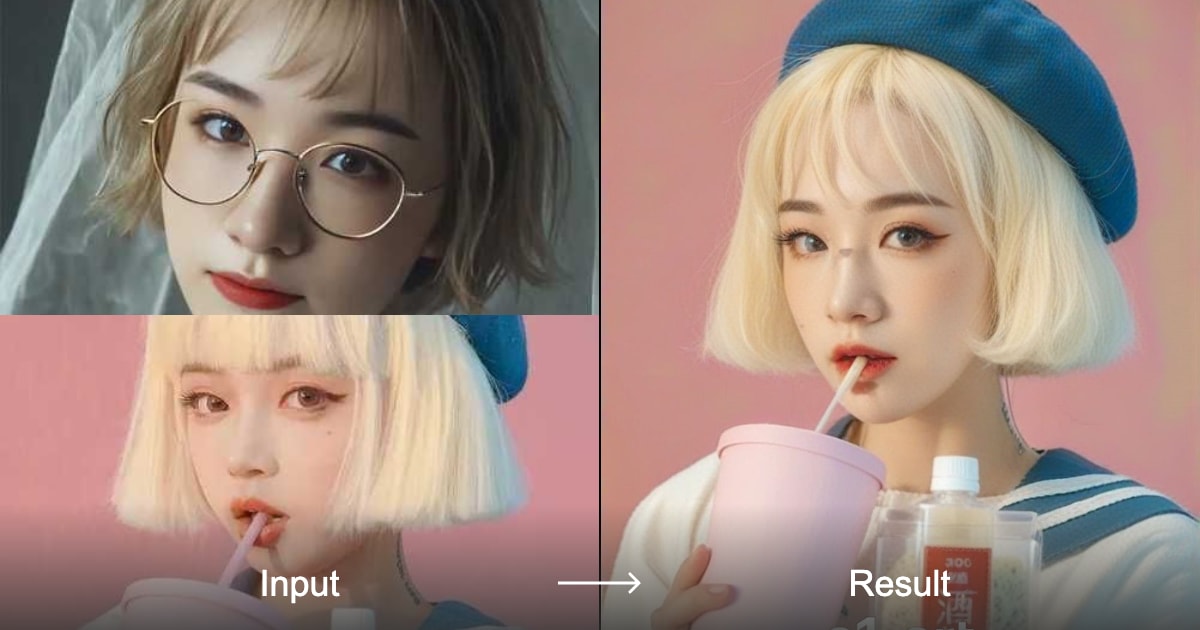
A landscape input-and-result example from an official public filter page. The target styling, pose, clothing, and scene remain dominant while the visible facial identity changes.
Face Swap in One Minute: Source, Target, and Result
Most confusion disappears once you separate the three roles in a face swap.
| Role | What it contributes | What it should not automatically control | A simple example |
|---|---|---|---|
| Source face | Identity cues such as the eyes, nose, mouth, brows, and characteristic facial proportions | The target's body, clothes, background, camera angle, or action | Your clear selfie |
| Target image or video | Head pose, expression, gaze, lighting, hair, body, scene, and motion | The final facial identity | A film-style portrait or a short dance clip |
| Output | A generated blend of the source identity and target performance or scene | Proof that the scene is real | Your face rendered into the chosen portrait or clip |
The word swap can be misleading because the system is rarely cutting out one face and pasting it onto another. Modern tools usually estimate facial landmarks, represent identity and pose, generate a compatible face region, and blend it back into the target. Because the output is generated rather than copied pixel for pixel, it can alter details unexpectedly.
This leads to the most useful mental model: a face swap is a preservation task with one intentional change. Identity is meant to change. Pose, expression, scene, and motion are usually meant to stay. Every quality check should ask whether the model respected that contract.
How Does AI Face Swap Work?
Different products use different models, but a typical AI face swap follows five broad stages.
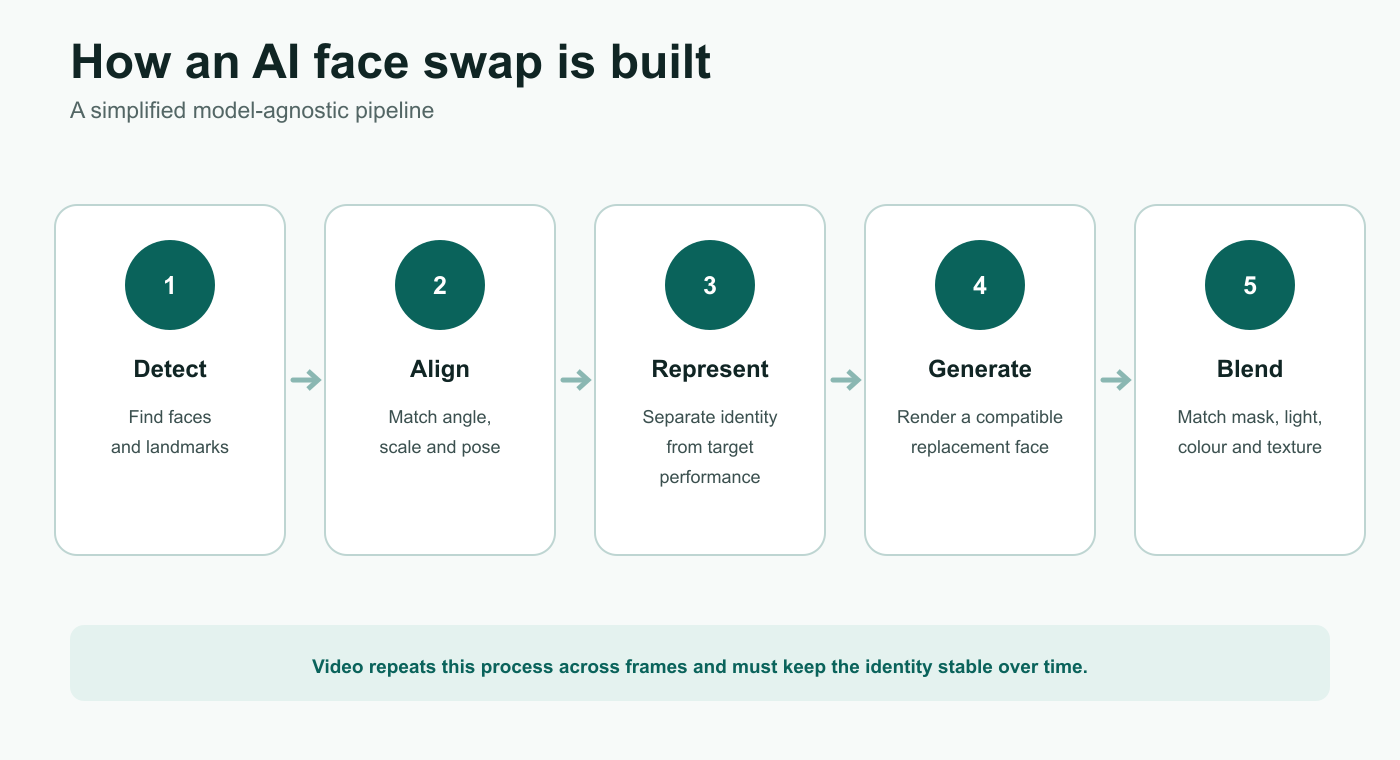
A simplified pipeline. Commercial tools may combine stages or use different model architectures, but detection, alignment, generation, and blending remain useful concepts for understanding the result.
1. The system detects each face
The tool first locates faces in the source and target. It may map landmarks around the eyes, brows, nose, mouth, jaw, and face outline. Those points describe where a face sits, how large it is, and which direction it is turned.
Detection is why a tiny face, a covered face, or a face at an extreme angle can fail before generation even begins. In a group photo, detection also determines whether the correct source is assigned to the correct target.
2. It aligns the source with the target
The source identity has to fit the target's angle and proportions. The system rotates, scales, or warps its internal representation so the eyes, nose, mouth, and jaw correspond to the target landmarks.
A forward-facing source portrait gives the model more usable identity information than a distant side profile. Alignment also becomes harder when glasses, hands, hair, jewellery, masks, or strong shadows cover important features.
3. The model separates identity from performance
The intended division is straightforward:
- the source supplies identity;
- the target supplies pose, gaze, expression, and scene;
- the model combines them into a new face that fits the target frame.
The separation is never perfect. Some source expression may leak into the output, or some target identity may remain. A result can therefore look polished yet resemble neither person strongly enough.
4. It generates and blends the new face region
The model renders a new face region, then tries to match the target's colour, light, grain, sharpness, and perspective. A mask or segmentation boundary helps join the generated face to the original hair, ears, neck, and background.
Many visible errors are blending errors rather than identity errors: a hard jaw edge, different skin tone, mismatched noise, missing glasses, or a face that is sharper than the rest of the image.
5. Video adds tracking and temporal consistency
For video face swap, the process repeats across frames. The system must track the face through turns, blinks, speech, motion blur, occlusion, and changing light. A single good frame does not guarantee a good clip. If facial shape or skin detail changes from frame to frame, viewers see flicker even when every still image looks acceptable on its own.
What Changes and What Should Stay the Same?
A useful face swap does not simply maximise resemblance. It balances identity transfer with continuity.
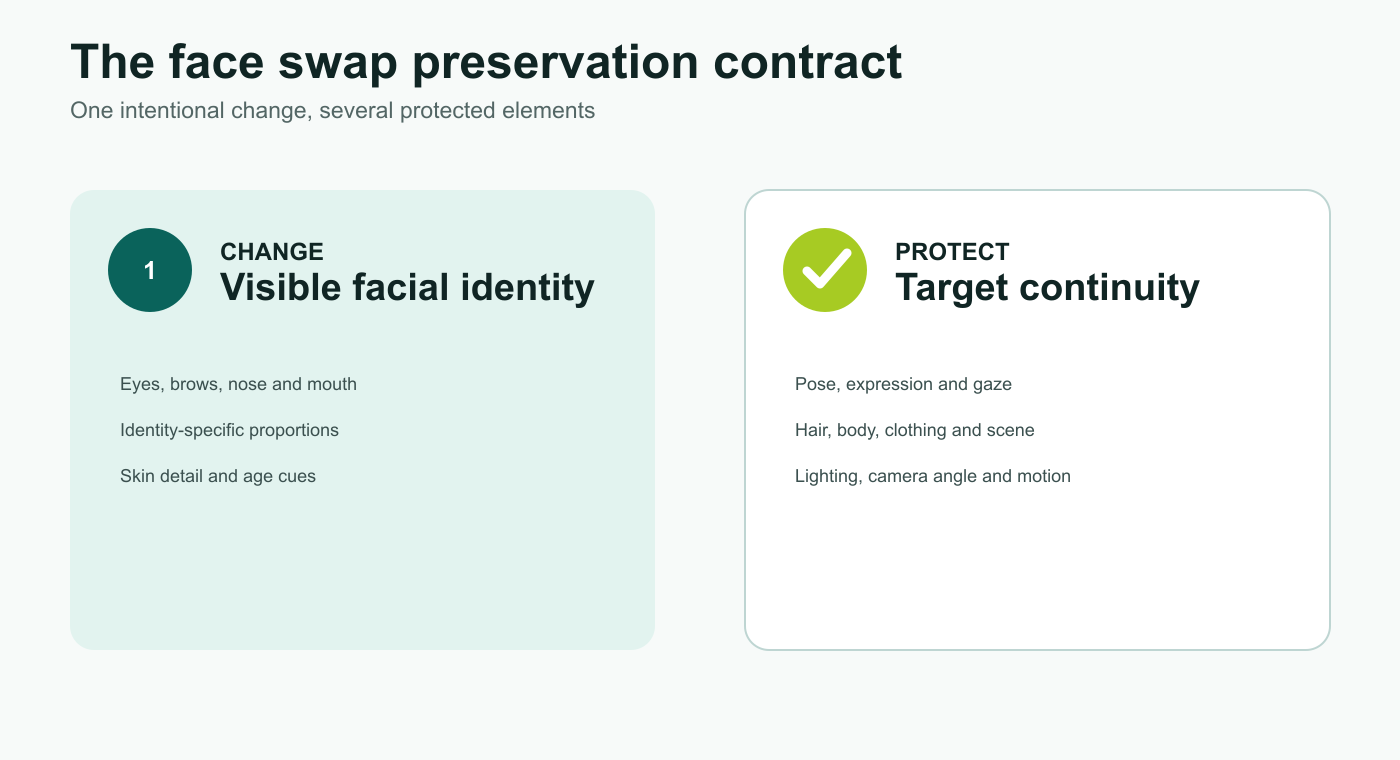
The preservation contract: change identity cues while protecting the target's performance and scene unless the selected effect intentionally changes more.
Usually meant to change:
- eyes, brows, nose, mouth, and facial proportions;
- identity-specific skin detail and age cues;
- visible likeness inside the face region.
Usually meant to remain:
- target pose, expression, gaze, and head direction;
- hairstyle, headwear, ears, body, clothes, and accessories;
- background, composition, lens perspective, and light direction;
- motion, timing, and camera movement in video.
The exact boundary depends on the tool. A narrow face swap may preserve hair and head shape. A head swap may replace hair, ears, skull outline, and neck transition. A creative style filter may intentionally redraw the entire image. Read the effect description and judge the result against the correct scope.
Face Swap vs Deepfake, Face Filter, and Style Transfer
These terms overlap, but they are not interchangeable.
| Technique | Main change | Usually preserves | Best understood as | Common risk |
|---|---|---|---|---|
| Face swap | Replaces one visible facial identity with another | Target pose, expression, body, and scene | Identity replacement | Impersonation or use without consent |
| Face filter | Adds makeup, age, accessories, distortion, or an effect | The same person's basic identity | Attribute editing | Misleading beauty or age representation |
| Head swap | Replaces face plus hair, head shape, ears, and sometimes neck | Target body, pose, and scene | Larger-region identity replacement | Bad neck seams and stronger identity misuse |
| Face reenactment | Drives one face with another person's expression or movement | The visible identity may remain | Performance transfer | Making someone appear to say or do something |
| Lip sync | Changes mouth movement to match audio | Most of the face and identity | Speech-performance editing | False speech attribution |
| AI avatar | Creates or animates a digital character | Depends on the product | Synthetic character generation | Confusion about whether a real person is depicted |
| Style transfer / AI Art Filter | Changes the visual language: painting, sketch, 3D, cinematic, and more | Composition and subject when the tool succeeds | Appearance transformation | Over-editing identity or copyrighted style concerns |
| Deepfake | Broad label for convincing synthetic or manipulated media involving identity or performance | Varies | A wider category, often discussed when realism or deception matters | Fraud, defamation, non-consensual imagery, misinformation |
A face swap is a technique. Deepfake is the broader category people often use for realistic synthetic identity or performance manipulation, especially when deception is possible. A consented, visibly stylised face swap may be harmless creative media. The same technique used to impersonate a person in a political message, financial request, or intimate image creates a very different risk.
DraDra's role is easiest to understand as a creative layer: after choosing a permitted face-related effect, an AI Art Filter on DraDra can move the result toward a sketch, painting, 3D render, or cinematic frame. That changes the aesthetic; it does not remove the need for consent or disclosure.
What Are Face Swaps Used For?
The safest uses are those in which everyone understands the edit and the output is presented in context.
Creative portraits and social content
Friends can make fictional character portraits, period looks, film-poster concepts, or clearly labelled memes. Stylisation often makes the creative intent easier to understand than a photorealistic result presented without context.
Storyboarding and pre-visualisation
Creators can explore casting, costume, composition, and mood before a full shoot. The output is a concept image, not a substitute for a performer's permission or a final production release.
Film and visual effects
Professional productions may use digital face replacement for stunt work, continuity, de-ageing, or character work. These uses involve contracts, performance rights, detailed compositing, and human review beyond a consumer filter.
Education and historical interpretation
A clearly disclosed reconstruction can help explain a historical setting or visualise a lesson. Avoid implying that the generated image is an archive photograph.
Art-style experiments
Face swap and style transfer can be combined to create a painted portrait, graphic-novel panel, 3D character, or cinematic still. This is where DraDra's Make Everything Art positioning fits naturally: the identity edit is one operation, and the AI Art Filter defines the visual treatment around it.
How to Make a Better Face Swap
The output depends heavily on the source and target. A stronger input often fixes more than a longer prompt.
Choose a source face with enough identity information
Use a sharp portrait with the full face visible. Neutral or natural expressions are flexible. Soft, even light helps the model read eye shape, nose structure, lip contours, jawline, and skin detail. Avoid beauty filters that reshape the source before the swap.
If the target is a side profile, a source image with a similar angle can help. Some systems accept multiple source images; when available, different angles and expressions may provide a fuller identity reference.
Choose a compatible target
Match the source and target on the factors that are difficult to reconstruct:
- similar head angle;
- similar facial visibility;
- compatible lighting direction and intensity;
- enough resolution around the face;
- limited motion blur;
- minimal obstruction by hair, hands, masks, or glasses.
Compatibility does not require the two people to have the same features. It reduces the number of details the model must guess.
Keep the first attempt simple
Start with one person, one clear target, and one visual goal. A multi-person video with fast cuts, sunglasses, profile turns, coloured stage light, and heavy compression tests every weak point at once.
Use a prompt only for the scene or style
When the effect already handles identity, use text to clarify the aesthetic rather than repeating the swap instruction. For example:
Preserve the target pose, expression, hairstyle, blue-hour lighting, camera angle, and background. Render the final image as a cinematic 35 mm film still with natural grain and realistic skin texture. Keep the face boundary, ears, jewellery, and neck transition coherent.
In a preset-led workflow, select the closest filter first. A long prompt cannot reliably rescue a source photo that is blurred or mostly hidden.
Review before downloading or posting
Zoom in, compare the result with both inputs, and check whether the final context could mislead someone. A technically clean swap can still be unsuitable to publish.
A Five-Part Face Swap Quality Test
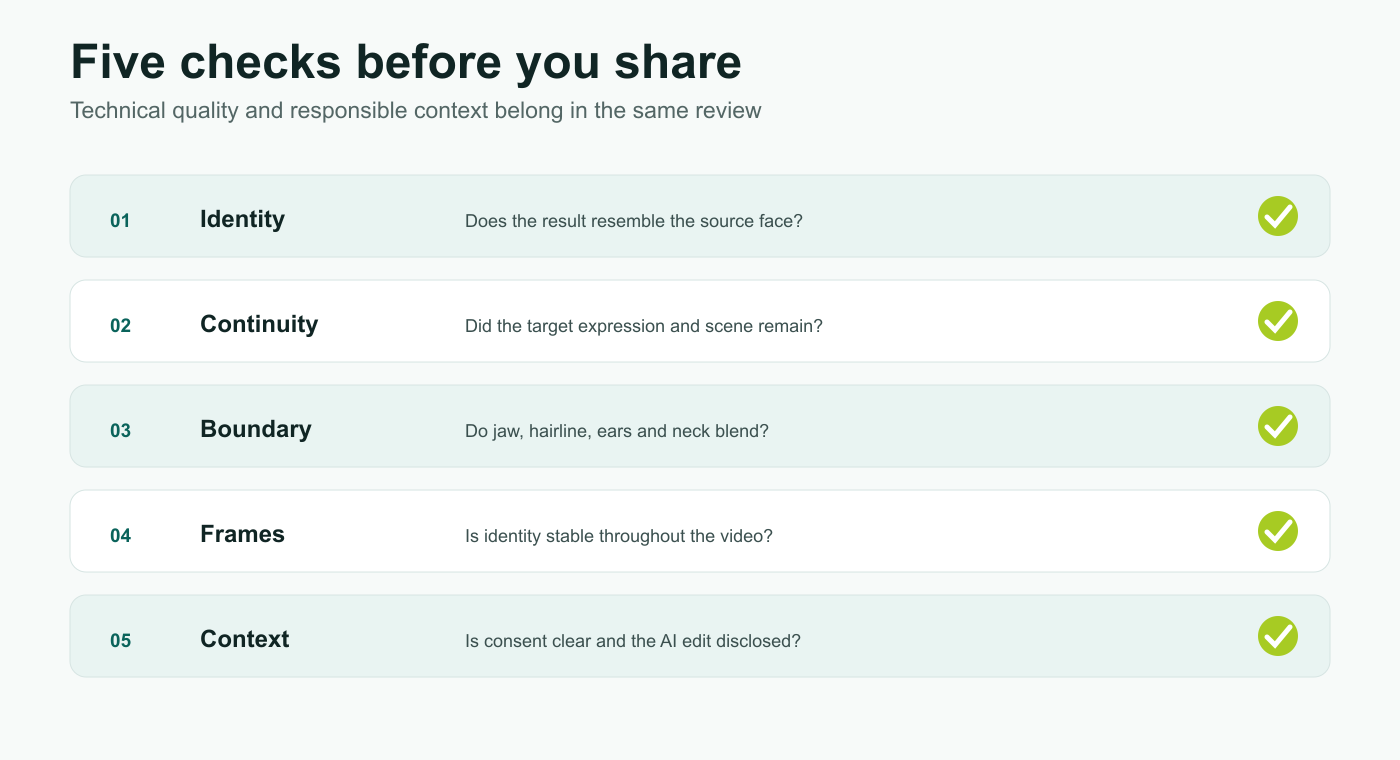
Review identity, target continuity, boundary quality, frame consistency, and context before sharing a face-swapped image or video.
1. Identity
Does the output resemble the source person in more than one feature? Check the eye area, nose, mouth, facial proportions, and distinctive marks. A familiar hairstyle can create a false sense of resemblance, so inspect the face itself.
2. Target continuity
Did the target's expression, gaze, pose, body, clothes, and scene remain coherent? If the target was smiling, the swap should not quietly turn the smile into a different emotion.
3. Boundary quality
Inspect the jaw, hairline, ears, glasses, teeth, lips, and neck. Look for double edges, smearing, mismatched colour, overly smooth skin, or a different level of sharpness from the rest of the image.
4. Frame consistency
For video, scrub through the clip rather than watching once at normal speed. Check profile turns, blinks, speech, fast movement, occlusions, and cuts. Look for flicker, identity drift, or one-frame failures.
5. Context and disclosure
Could a reasonable viewer mistake the result for a real event? If yes, make the AI-edit disclosure more obvious, change the presentation, or do not publish it. Technical quality never overrides consent or context.
Common Face Swap Problems and How to Fix Them
| Symptom | Likely cause | Best next step |
|---|---|---|
| The face is not recognised | Source is small, blurred, filtered, or partly covered | Use a larger, sharper, unfiltered source with the full face visible |
| The result resembles the target more than the source | Identity transfer is weak or the source lacks distinctive detail | Try a clearer source or additional angles if supported |
| The expression changed | Source expression leaked into the output or the effect rebuilds too much | Use a more neutral source and an effect that preserves target performance |
| Skin tone or light looks pasted on | Source and target lighting are incompatible or blending failed | Choose a target with similar light; regenerate and inspect the jaw and neck |
| Glasses or jewellery disappear | The object crosses the generated face boundary | Use a cleaner target or restore the accessory in a local edit |
| The hairline or ears melt | The mask boundary is uncertain | Prefer an effect that limits the swap to the central face; avoid heavy occlusion |
| Video flickers | Tracking or frame-to-frame identity consistency failed | Use steadier, well-lit footage with slower turns and shorter duration |
| The wrong person changes in a group | Face assignment is ambiguous | Use a tool with explicit face mapping or edit one person at a time |
| The output looks too perfect or plastic | Excess smoothing or mismatched texture | Reduce enhancement, preserve grain, and compare sharpness with the target |
When the same error repeats, change one variable at a time. Replacing the source, target, effect, prompt, and crop together makes it impossible to learn which change helped.
How to Use Face Swap Responsibly in India
Face swapping is not risk-free simply because it is easy to generate. The Government of India's current framework addresses identity theft, impersonation, privacy violations, deceptive deepfakes, obscene or sexually explicit material, and content that harms children. Current intermediary rules also place emphasis on clear labelling and traceable metadata for permissible synthetic content.
For an ordinary creator, the practical standard is straightforward:
- Get permission. Use your own face or obtain informed permission from every identifiable person whose likeness is used.
- Explain the intended context. Permission for a birthday meme is not permission for an advertisement, dating profile, political message, or intimate scene.
- Label the edit clearly. Use wording such as “AI face swap,” “AI-edited,” or “synthetic media” where viewers can see it.
- Preserve provenance. Do not remove labels, metadata, or watermarks that help others understand how the media was made.
- Avoid sensitive targets. Do not use face swap to impersonate someone, solicit money, fake an endorsement, manufacture evidence, create non-consensual intimate content, or humiliate a person.
- Protect children. Do not create or publish face swaps involving minors without a lawful, age-appropriate purpose and permission from a parent or guardian. Never place a child in sexualised, humiliating, or deceptive content.
- Keep evidence if you are targeted. Save the URL, account name, timestamps, screenshots, and original files before reporting abusive content to the platform or relevant authorities.
This is practical safety guidance, not legal advice. The applicable law and platform process depend on the facts, the people depicted, and how the media is distributed.
What to Check Before Uploading a Face
Your face is personal data. Before using any face swap app, read its current privacy policy and answer these questions:
- Is the upload retained after generation?
- Is it used to train models?
- Is it shared with service providers or other third parties?
- Where is it processed and stored?
- Can you delete both uploads and generated results?
- Does the app create or retain biometric identifiers or facial templates?
DraDra's official privacy policy states that its face-related services include image face-swapping, face detection for alignment, and face merging. The policy says voluntarily uploaded photos are used for the requested AI effect, are not used for model training, are not shared with third parties, and are not retained beyond the processing period. It also says no biometric identifiers or facial templates are extracted or stored. Its FAQ says uploaded images can be deleted by long-pressing within a filter and generated media can be deleted from Profile → Generations.
Those statements describe the current official policy; users should still review the latest version before uploading sensitive images. The policy also states that personal information is processed and stored in the United States, which may matter to users who need data localisation or organisational approval.
How to Explore Face Swap and AI Art Filters With DraDra
Use DraDra when your goal is creative transformation rather than forensic identity editing. The product is positioned around AI Art Filters for photo and video, with styles such as painting, sketch, 3D, and cinematic looks.
- Open DraDra and choose a face-related or art-style effect that matches the intended output.
- Upload a photo or video you own or have permission to edit.
- Use a clear source with enough facial detail and a target that matches the angle and lighting.
- Generate the result and apply the five-part quality test above.
- Delete weak or unwanted generations and keep only the version you can use responsibly.
- Add a visible AI-edit disclosure before publishing.
No public pricing page or definitive commercial-licensing terms were supplied for this article. Check the current DraDra product page and applicable terms for price, credits, output rights, and commercial-use restrictions before a paid or client project. A tool's permission to generate an image does not grant rights to another person's likeness, copyrighted source media, trademarks, or private material.
How Can You Tell if an Image Has Been Face-Swapped?
There is no universal visual trick. Obvious mistakes can include inconsistent face edges, light, skin texture, glasses, teeth, or lip movement, but strong outputs may not show them. Old advice such as relying on unnatural blinking is not dependable on its own.
Use several checks together:
- find the earliest available version and its original context;
- check whether a credible source published the same event;
- inspect the face boundary, ears, hairline, glasses, teeth, light, and shadows;
- compare speech with lip movement in video;
- look for a disclosure, content credential, watermark, or platform label;
- reverse-search key frames when the claim matters;
- treat extraordinary financial, political, or personal claims as unverified until independently confirmed.
The right question is not only “Does this face look strange?” It is “Where did this file come from, what claim is attached to it, and can that claim be verified elsewhere?”
Frequently Asked Questions
Is face swap the same as deepfake?
Not exactly. Face swap is a specific identity-replacement technique. Deepfake is a broader term for convincing synthetic or manipulated media involving identity, appearance, voice, or performance. A face swap can be a type of deepfake, especially when it is realistic or deceptive, but the purpose and presentation matter.
Can face swap work from one photo?
Many consumer tools accept one source portrait, but results vary. A clear, front-facing image usually provides more identity information. Some systems perform better when they can use several angles or expressions.
Does face swap change hair and head shape?
Usually not in a narrow face swap. Hair, ears, and overall head shape often come from the target. If you need those features changed too, look for a head-swap or full-character workflow and expect a larger edit boundary.
Can AI face swap a video?
Yes. Video is harder because the face must remain stable across every frame. Fast turns, motion blur, speaking, occlusion, glasses, and changing light can cause flicker or identity drift.
Can I face swap several people in one group photo?
Some tools support multiple faces. Use explicit face mapping where available and check each person separately. When assignments are unclear, edit one face at a time.
Is it legal to face swap someone in India?
The answer depends on consent, purpose, content, and distribution. Impersonation, privacy violations, deceptive deepfakes, non-consensual intimate imagery, fraud, defamation, and harmful content can trigger legal and platform consequences. Obtain permission, disclose the edit, and seek qualified legal advice for sensitive or commercial uses.
Can I use a face-swapped image commercially?
Only after checking the tool's current licence and every underlying right. You may need permission for the source face, target photo or video, music, trademarks, characters, locations, and other protected material. DraDra's commercial-use terms were not supplied, so confirm them on the current official service before client work.
Will an AI Art Filter make a face swap safer?
Stylisation can make the fictional or artistic intent clearer, but it does not create consent or erase identity rights. Label the output, use permitted source material, and avoid misleading contexts even when the result looks like a painting or 3D animation.
Face Swap Is an Identity Edit, Not Proof of Reality
The clearest definition is also the most useful: face swap transfers facial identity from a source into a target photo or video while trying to preserve the target's performance and scene. Good results depend on clear inputs, compatible angles and light, careful blending, and frame consistency. Responsible results also depend on permission, disclosure, privacy checks, and an honest context.
For creative work, DraDra can extend a consented face-related edit into a painting, sketch, 3D, cinematic, or other AI art treatment. Start with media you are allowed to use, inspect the result closely, and label it as AI-edited before you share it.